 Fighty AI
AWS does not accept USDT or any cryptocurrency as a payment method. But a growing number of developers and businesses pay for AWS with USDT anyway — through third-party services that bridge the gap between crypto and cloud billing.
If you're reading this, you probably already know that part. The questions that actually decide whether you go ahead are narrower and more practical: If I send 1,000 USDT, do I get exactly 1,000 in balance? Are there hidden fees? Is it a real account or a panel? Where do I even see my credit afterwards? Those are the questions our most experienced customer asked before he paid — and they are the ones most guides skip.
This guide covers the three ways to use USDT for AWS, the real cost difference between TRC20 and ERC20, the prepaid-versus-invoice question that trips up first-time buyers, and — the part competitors rarely write down — exactly what happens after you pay. If you want a broader comparison that includes debit cards, UPI, wire transfers and other non-crypto options, see How to Pay for AWS Without a Credit Card.
Why pay for AWS with USDT?
The reasons are practical, not ideological. Most developers using USDT for cloud aren't crypto enthusiasts — they're people whose local payment infrastructure doesn't work with AWS.
- No usable credit card. Credit card penetration in India is around 5%, in Nigeria about 2%, in Pakistan under 1%. Even developers who have cards often find them rejected — domestic debit cards from banks like SBI and Union Bank regularly fail AWS signup even with Visa logos.
- FX and banking friction. International wire transfers cost $15-45 per transaction and take days. Many local banks in Southeast Asia, Africa, and South America either block cloud service charges or add 3-5% foreign exchange markup.
- Budget control. AWS uses postpaid billing by default. You use services first, get billed later. If you lose track of spending, you get a surprise bill. If your payment method fails, AWS suspends your account after 15-30 days and may delete your data.
- Speed. A USDT transfer on TRC20 confirms in about 3 seconds. No bank approval, no business hours, no waiting for wire processing.
None of these reasons require you to be in a specific country or industry. A freelance developer in Lagos, a startup in Karachi, and an agency in Jakarta all face the same payment wall.
The first real question: is the balance 1:1, and what does it cost?
Before anything else, buyers want to know whether the money arrives intact. It's a fair worry — you're sending crypto to fund an account you can't see yet.
On a self-service prepaid platform, the credit rate is 1:1: 1,000 USDT becomes 1,000 in cloud balance, shown to you on the order page before you commit. There is no conversion markup baked into that number. The one cost that sits outside the 1:1 rate is the TRC20 network fee — roughly 1-2 USDT — and that's charged by the blockchain, not the platform.
This matters because the alternatives don't work this way. A virtual-card service adds a card-creation fee plus a per-transaction percentage and, often, a spread on the crypto-to-fiat conversion. A Telegram reseller might quote a lower headline number but gives you no way to verify the rate before you send. "1:1, shown before payment, network fee only" is the cleanest version of the deal — and it's the one you should be able to confirm on screen, not take on trust.
One detail surprises almost everyone the first time: the amount you're asked to send may read 500.258 rather than a round 500. That decimal is not a fee. It's covered in full below — but the short version is that it's how an on-chain payment gets matched to your specific order.
Three ways to pay for AWS with crypto
Not all crypto-to-cloud services work the same way. There are three distinct models, each with different trade-offs in cost, speed, control, and trust.
1. Telegram-based resellers
The oldest and most common model. You message someone on Telegram, negotiate a price, send crypto to their wallet, and wait for account credentials to be delivered in the chat.
How it works: You find a reseller through Telegram groups, forums like BlackHatWorld or Bitcointalk, or word of mouth. Pricing, turnaround time, and what you actually receive vary from person to person.
Advantages: Often the cheapest option in terms of upfront price. Some resellers offer heavily discounted credits.
Risks: No price transparency before payment. No automated matching — you send crypto to a personal wallet and trust the person to deliver. No way to verify the source of the account or credits. If the account is later flagged by AWS for policy violations, you lose everything with no recourse.
2. Crypto-funded virtual cards
Services like Moon issue virtual Visa or Mastercard numbers funded by cryptocurrency. You load USDT onto the card, then enter that card number on AWS as your payment method — just like a regular credit card.
How it works: Create an account, fund a virtual card with crypto, use that card on AWS. The card provider handles the crypto-to-fiat conversion.
Advantages: Works within AWS's standard payment flow. You keep your own AWS account. Familiar card-based experience.
Costs: Moon charges $1.49-$2.99 per card creation, plus 1% per transaction (minimum $1) for reloadable cards. There may be additional spread on the crypto-to-fiat conversion.
Risks: You remain on postpaid billing. AWS can charge more than your card balance — if your card declines, the suspension clock starts ticking. Moon's Trustpilot rating is 2.8 out of 5 based on 262 reviews, with multiple reports of account freezes and difficulty recovering locked funds. If the card provider goes down or freezes your account, your AWS payment method fails immediately.
3. Self-service prepaid platforms
A newer model. You visit a web portal, choose a cloud provider, enter an amount, and send USDT to a TRC20 address. The system matches your payment on-chain and delivers a fully funded cloud account within minutes.
How it works: The platform creates a cloud account — AWS, GCP, prepaid Alibaba Cloud, or Tencent Cloud — and loads your balance. You receive full console credentials. Usage is deducted from your prepaid balance.
Advantages: Price is visible before you pay. Payment matching is automated. Account delivery is automated. Prepaid model means no surprise bills. No card or bank account needed at any step.
Costs: TRC20 network fee only, typically 1-2 USDT per transaction.
Limitations: You receive a new account, not a top-up for an existing one. Migration of existing workloads is required if you're switching.
Fighty AI is one example of this model. The rest of this guide uses our platform for the step-by-step walkthrough and the "what happens after you pay" section, since it's what we can explain from direct experience.
Quick comparison
| Model | Price Transparency | Billing Type | Delivery | Trust Signal |
|---|---|---|---|---|
| TG reseller | Negotiated per deal | Varies | Manual (hours to days) | Reputation only |
| Virtual card | Published fees | Postpaid | Instant (card number) | Public reviews |
| Self-service prepaid — best value | Shown before payment | Prepaid | Automated (minutes) | Website + public presence |
Ready for a USDT-funded AWS account?
Real AWS console, 1:1 balance shown before you pay, activated in 3–5 minutes. No bridge services, no card.
Prepaid vs. postpaid: why it matters more than you think
This is the question that confuses most first-time buyers. If you've used AWS before, you're used to postpaid billing: use services, get an invoice at the end of the month, pay it. Simple. Our most experienced customer — someone who had previously handled third-party AWS billing professionally — still paused here to confirm how prepaid balance maps onto AWS's normal invoice model. If he double-checked it, it's worth getting right.
Postpaid billing comes with real risks that developers often don't think about until it's too late:
- Surprise bills. AWS charges are usage-based. An auto-scaling group, a forgotten EC2 instance, or a misconfigured S3 bucket can generate hundreds or thousands of dollars in charges you didn't anticipate.
- Suspension cascade. When your payment method fails — card expired, balance insufficient, bank blocks the charge — AWS retries in weeks 1 and 3 of each month. After 15-30 days of failed payments, your account is suspended. Services stop. After another 30 days, data starts being deleted.
- The Catch-22. One user on AWS re:Post reported that after their card expired, the account was suspended — but the billing console wouldn't let them update their payment method while suspended. The account was stuck: can't pay because it's locked, can't unlock because it hasn't been paid.
- Data loss. Another user lost an entire RDS database 21 days after suspension. The cause wasn't overspending — it was a bank-side issue that blocked the recurring charge.
Prepaid billing eliminates this payment-failure path. You fund the account before you use it. Your balance goes down as you consume services. When it runs low, you top up. If you don't top up, services wind down — but there's no invoice, no failed payment, no suspension cascade, and no data deletion triggered by a bank problem you didn't cause. (Prepaid does not make an account immune to policy-based suspension — see the after-sales section below for that distinction.)
For developers managing budgets tightly — especially freelancers, small teams, and businesses in regions where payment failures are common — prepaid is not just a convenience. It's protection.
TRC20 vs. ERC20: which network to use
If you're paying with USDT, you need to choose a network. This matters because the cost and speed difference is significant.
| Network | Transaction Fee | Confirmation Time | Share of USDT Supply |
|---|---|---|---|
| TRC20 (TRON) | $1-2 | ~3 seconds | ~48% |
| ERC20 (Ethereum) | $3-20 (up to $30+ during congestion) | 1-60 minutes | ~35% |
For a $500 payment, TRC20 costs 0.2-0.4% in network fees. ERC20 can cost 0.6-6%. On a $5,000 payment, TRC20 fees are negligible. ERC20 fees are still $3-20 regardless of amount — Ethereum charges by computation, not by transfer size.
TRC20 is the standard for most crypto payment services because of this cost-speed advantage. After TRON's Proposal #104 in 2025, fees dropped further by reducing the energy cost per transaction. Most platforms that accept USDT default to TRC20.
Bottom line: Use TRC20 unless you have a specific reason not to. If your USDT is currently on Ethereum, consider bridging to TRON first — the network fee savings will likely exceed the bridge cost on any payment above $200.
Step-by-step: paying for AWS with USDT
Here's the actual process using Fighty AI's self-service portal. The whole thing takes under 5 minutes.
What you need
- A crypto wallet with USDT on the TRC20 network
- The minimum first top-up for your cloud provider: $500 for AWS or GCP, $50 for Alibaba Cloud or Tencent Cloud
No ID verification. No credit card. No bank account.
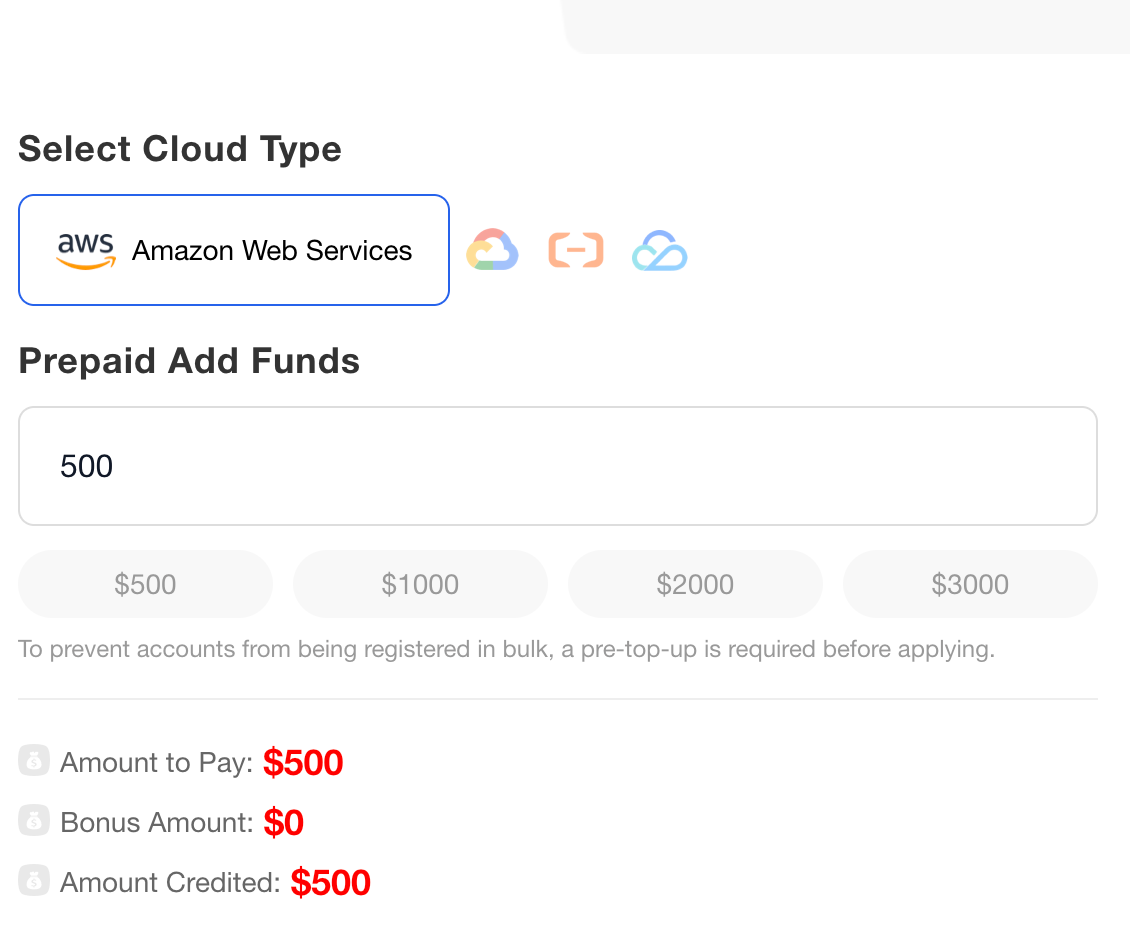
Step 1: Choose your cloud provider and amount
Go to fightyai.cloud and select your cloud provider — AWS, Google Cloud, Alibaba Cloud International, or Tencent Cloud International. Enter the amount you want to fund.
The portal shows you the exact USDT amount to pay and the exact balance that will appear in your cloud account before you commit. The rate is 1:1 — 1,000 USDT becomes $1,000 in cloud balance. No conversion fees, no markup.
First top-ups include a bonus credit on qualifying amounts — for example, a first top-up at the $3,000 tier is credited above face value. The bonus applies to the first top-up, not to every reload. For larger volumes, get in touch on WhatsApp or Telegram to discuss terms.
Step 2: Send USDT via TRC20
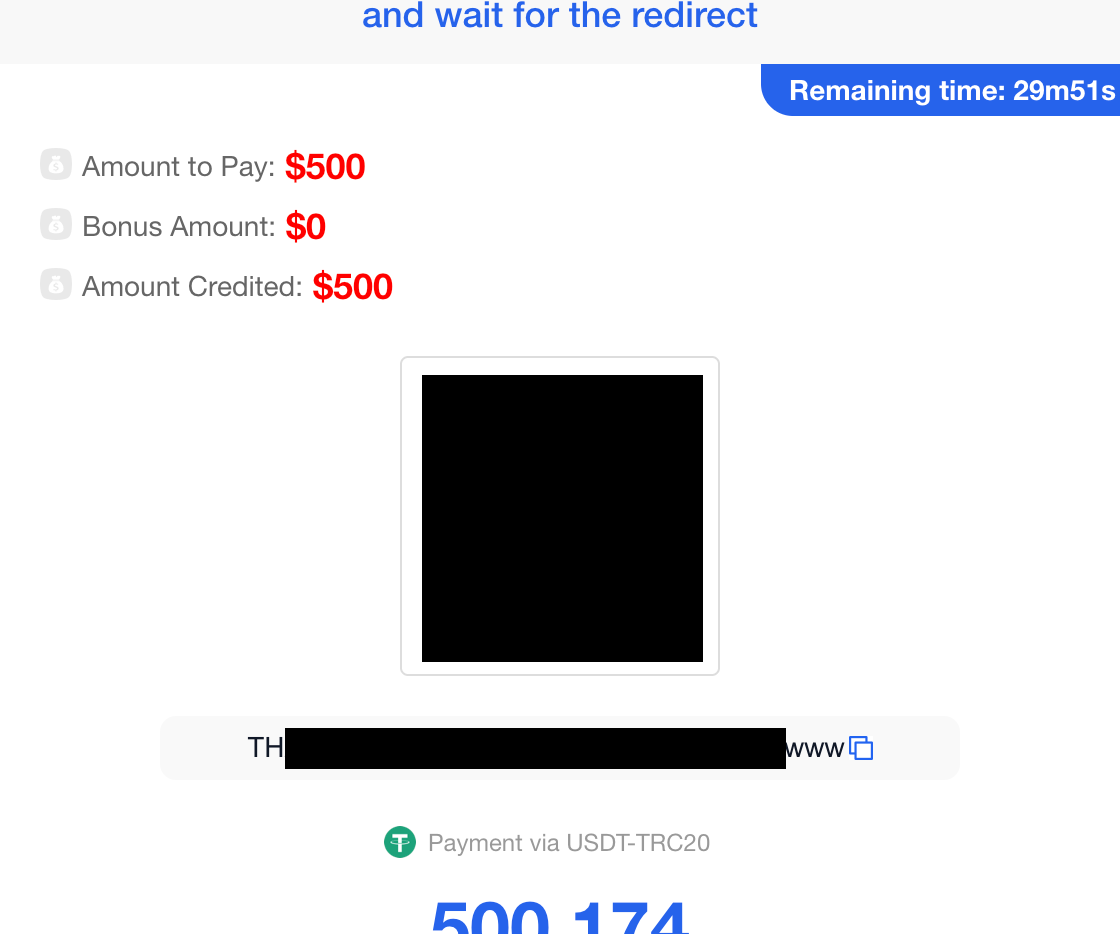
After clicking Submit, you'll see a payment page with a QR code and a TRC20 wallet address. Send the exact USDT amount shown.
About the decimal: You might see an amount like 500.258 instead of a round 500.000. This is normal. Because blockchain transactions don't carry reference numbers or memos like bank transfers, the system uses the exact decimal to match your payment to your order automatically. The decimal is not an extra fee — you pay the amount shown and receive the full balance.
Payment is confirmed on-chain in about 3 seconds. No manual verification, no sending screenshots, no waiting for someone to check Telegram.
Step 3: Receive your cloud account
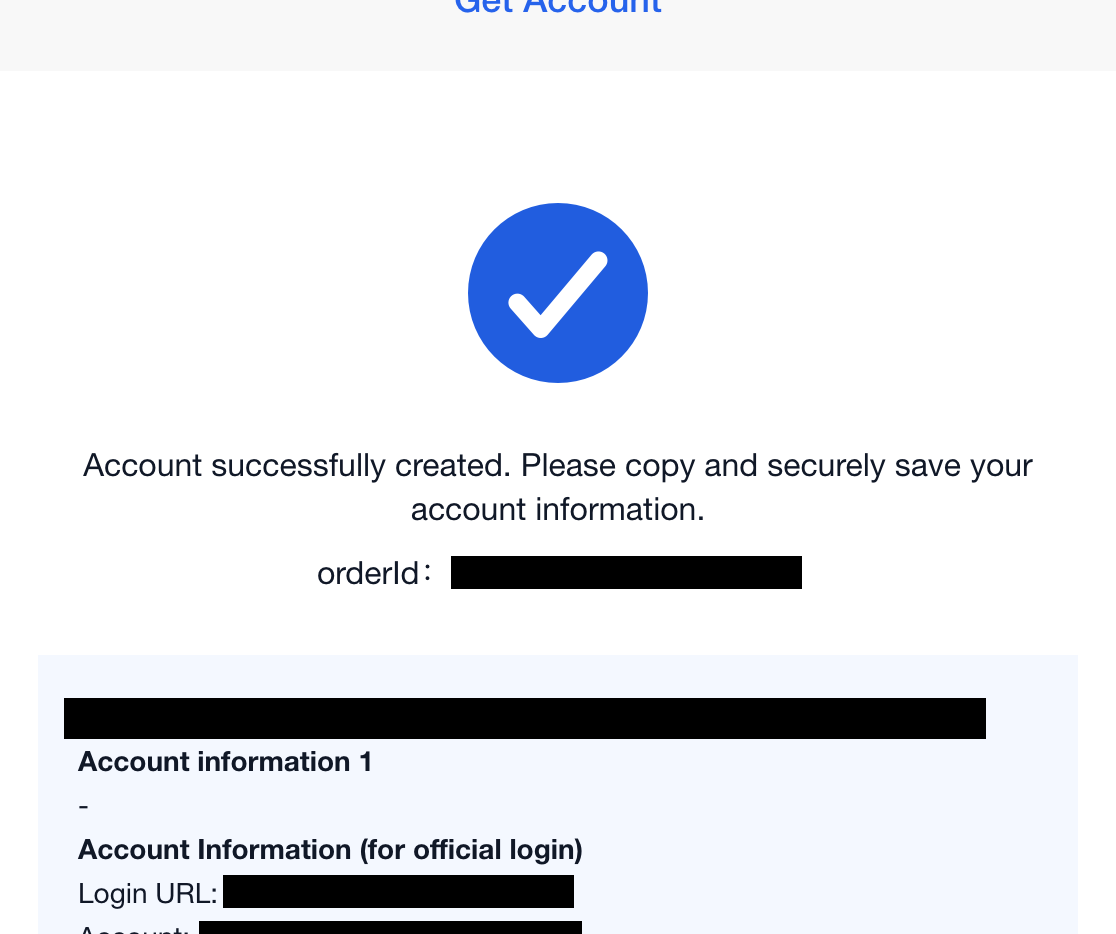
Within 3-5 minutes after payment confirms, you receive a complete AWS account:
- Console login URL
- Account credentials (username + password)
- Account UID
- Verification email access
This is a full, native AWS console account — the same as signing up directly with Amazon. You can deploy EC2, S3, Lambda, RDS, ECS, or any other AWS service. Not a shared dashboard. Not a restricted panel. Full root access.
Topping up
When your balance runs low, go back to the portal, select "Add Funds," and send another USDT payment. Same process, same speed. The new balance transfers to the same account — there's no limit on how many times you can top up.
After you pay: what you get, and the four things first-timers ask
Most guides stop at "you receive an account." The real friction starts in the first ten minutes after login — and it's almost always the same four questions. Here's what to expect, drawn from what actual customers hit on day one.
1. Root account or IAM user?
You receive the root account — the root email and password — not a limited IAM user. That's what gives you full control, including billing settings and account recovery. The right first move is the same one AWS recommends for any account: sign in as root, enable MFA, then create an IAM user (or IAM Identity Center user) for your everyday work and leave root for break-glass tasks only. If a seller ever hands you an IAM user instead of root, you don't fully control the account — that's the difference to check for.
2. Where is my credit? I funded it but I can't see a balance
This one catches nearly everyone. Prepaid credit does not show on the main AWS console homepage. It lives in Billing and Cost Management → Credits / Payments, and your spend draws down from there. After a top-up, the new amount transfers into that same balance. If you've just funded an account and the dashboard looks empty, you're almost certainly looking at the wrong screen — not missing money. When in doubt, ask and we'll send you the exact path.
3. The console is in Chinese — how do I read it?
Depending on how an account was provisioned, the console may open in another language. You change it once from the language selector in the console footer (or under your account's Unified Settings), set it to English, and it stays. It's a one-time setting, not a sign the account is wrong — but it's a real five-minute speed bump for an English-speaking buyer, so it's worth knowing before you log in.
4. How do I confirm it's the real thing?
Trust is the biggest concern when paying for a cloud account through a third party. Four checks settle it:
- Console URL. You should land on signin.aws.amazon.com — the native AWS console. A custom dashboard or panel URL means a reseller portal, not direct AWS access.
- Root credentials. You should hold the root email and password, which means full control and recovery.
- Service availability. Launch an EC2 instance, create an S3 bucket, open the Lambda console. Everything should work. Blocked services mean undisclosed limits.
- Billing visibility. Open the billing console and confirm you can see your balance and set billing alerts. If billing is hidden from you, you don't have full control.
Risk, suspension, and after-sales — what we do and don't promise
Honesty here is part of the deal. Prepaid funding removes the payment-failure route to suspension, but it does not make an account untouchable. AWS can suspend any account — including ones you open directly with a card — for Acceptable Use Policy or Trust & Safety reasons such as unauthorized access, abuse, or activity that trips automated risk systems.
So here's the line we hold, plainly:
- What we don't promise: we will not tell you an account can never be banned, and we don't offer native IP, residential IP, DDoS resistance, or managed operations. Anyone promising "guaranteed no ban" is selling you a story.
- What we do: if an account is flagged, we help you read the actual notice, identify whether it's resolvable, and work through reinstatement where it is. A policy review that's triggered by a fixable issue can often be recovered; abuse-driven action usually can't, and we'll tell you that straight.
- What you control: keep workloads within AWS policy, enable MFA, don't share root, and don't run anything on the prohibited list (gambling, adult content, fraud, attacks). The cleaner the usage, the lower the risk — on any account, bought any way.
That's the difference between a reseller who disappears after payment and a service that's still answering when something needs sorting out.
Frequently asked questions
Does AWS accept USDT or cryptocurrency directly?
No. AWS does not accept any cryptocurrency as a direct payment method. The only ways to use USDT for AWS are through third-party services: virtual card providers that convert crypto to a card number you can enter on AWS, or prepaid cloud platforms that fund an AWS account on your behalf using USDT.
If I send 1,000 USDT, do I get exactly 1,000 in balance, or are there hidden fees?
On a self-service prepaid platform the rate is 1:1 — 1,000 USDT becomes 1,000 in balance, shown before you pay. The only cost outside that is the TRC20 network fee of about 1-2 USDT, charged by the blockchain, not the platform. Confirm the 1:1 rate and exact balance on the order page before sending.
What is the difference between prepaid and postpaid AWS billing?
With postpaid (the default), you use AWS services first and receive a bill at month's end. If your payment method fails, AWS suspends the account after 15-30 days and may delete data after another 30. With prepaid, you fund upfront and usage deducts from the balance — no surprise bills, no payment-failure suspension.
Why does the payment amount have extra decimals like 500.258?
The extra decimal is a unique identifier for your transaction. Because blockchain payments don't carry a memo or reference number like bank transfers, the system uses the exact decimal amount to match your payment to your order automatically. It is not an additional fee.
Which USDT network should I use — TRC20 or ERC20?
TRC20 (TRON network). Fees are 1-2 USDT and confirmation takes about 3 seconds. ERC20 (Ethereum) fees range from 3-20 USDT and can take up to an hour. TRC20 carries roughly 48% of all USDT in circulation and is the standard for most payment services.
Is it a root account or an IAM user?
The root account, including the root email and password — full control over billing and recovery. Best practice on delivery: enable MFA on root and create an IAM user for daily work. If you're handed an IAM user instead of root, you don't fully control the account.
Where do I see my balance or credit after funding?
In Billing and Cost Management under credits and balance — not on the main dashboard, which is why first-timers often think it's missing. After a top-up, the new balance transfers there. If you can't find it, ask and we'll point you to the exact screen.
The console is showing Chinese — how do I switch to English?
Change the language once from the selector in the AWS console footer (or in Unified Settings) and it stays in English. It's a one-time setting, not a problem with the account.
Can you guarantee the account will never be suspended?
No — and be wary of anyone who does. AWS can suspend any account, including ones bought directly, for policy reasons. Prepaid removes the payment-failure path to suspension, not policy enforcement. If an account is flagged, we help you understand the notice and pursue reinstatement where the issue is resolvable. We don't promise no bans, native IP, residential IP, or DDoS resistance.
Can I top up an existing AWS account with USDT?
Not an existing account. You receive a new AWS account with the balance loaded; existing workloads would need migrating. For ongoing usage, you can top up the same prepaid account repeatedly.
What happens if I run out of balance?
Services wind down as the balance depletes. Unlike postpaid, there's no invoice or payment failure — you simply top up to continue. No suspension cascade, no Catch-22 with a locked billing console.
What's the minimum, and do you support other clouds?
The minimum first top-up is $500 for AWS and Google Cloud, $50 for Alibaba Cloud International and Tencent Cloud International. No minimum monthly usage. The same portal and USDT-TRC20 process supports all four.
Who actually uses this
One of our customers had previously handled third-party AWS billing at an AWS Partner — manual invoicing, no automation — so he knew exactly what he was comparing against when he found us. He asked the hard questions first (1:1 balance, prepaid vs invoice, root vs IAM, where the credit shows), funded an AWS account with USDT, hit a Trust & Safety review along the way, worked through it with us, and has kept topping up since. That's the honest shape of it: not "click and forget," but a real account with a real person on the other end when something needs sorting.
We serve developers and small teams across Nigeria, Pakistan, India, Bangladesh, Kenya and beyond — and Chinese founders building overseas — who hit the same payment wall. Real console, face-value rate, and a reply in minutes, not days.
Making the decision
If you have a working credit card and are comfortable with postpaid billing, you don't need any of this — just sign up for AWS directly. For alternative payment methods that don't involve crypto, see our guide to paying for AWS without a credit card.
If you have USDT and need cloud access, your choice comes down to what matters most to you:
- Lowest price and you're comfortable with trust-based transactions? A Telegram reseller will likely offer the best headline deal. Just understand the risks and the lack of recourse.
- Want to keep your existing AWS account and payment flow? A virtual card puts a card number on your existing account. You stay on postpaid billing with all its pros and cons.
- Want prepaid billing, a visible 1:1 rate, and no card dependency? A self-service prepaid platform gives you budget control, automated payment matching, and removes the postpaid suspension risk.
If you want to try the prepaid approach, Fighty AI's self-service portal takes about 5 minutes from payment to account delivery. For questions, reach out on WhatsApp or Telegram — a real person replies, usually within minutes.
3 methods, 1 shortcut
Skip the DIY path. Fund your AWS account on fightyai.cloud — 3–5 minute activation, real root console, 1:1 rate shown before you pay.